Early access

Read smarter,
not more

AI reading assistant for Chrome. Get the insight from any article in seconds โ€” without reading the whole thing.

Join the waitlist See how it works
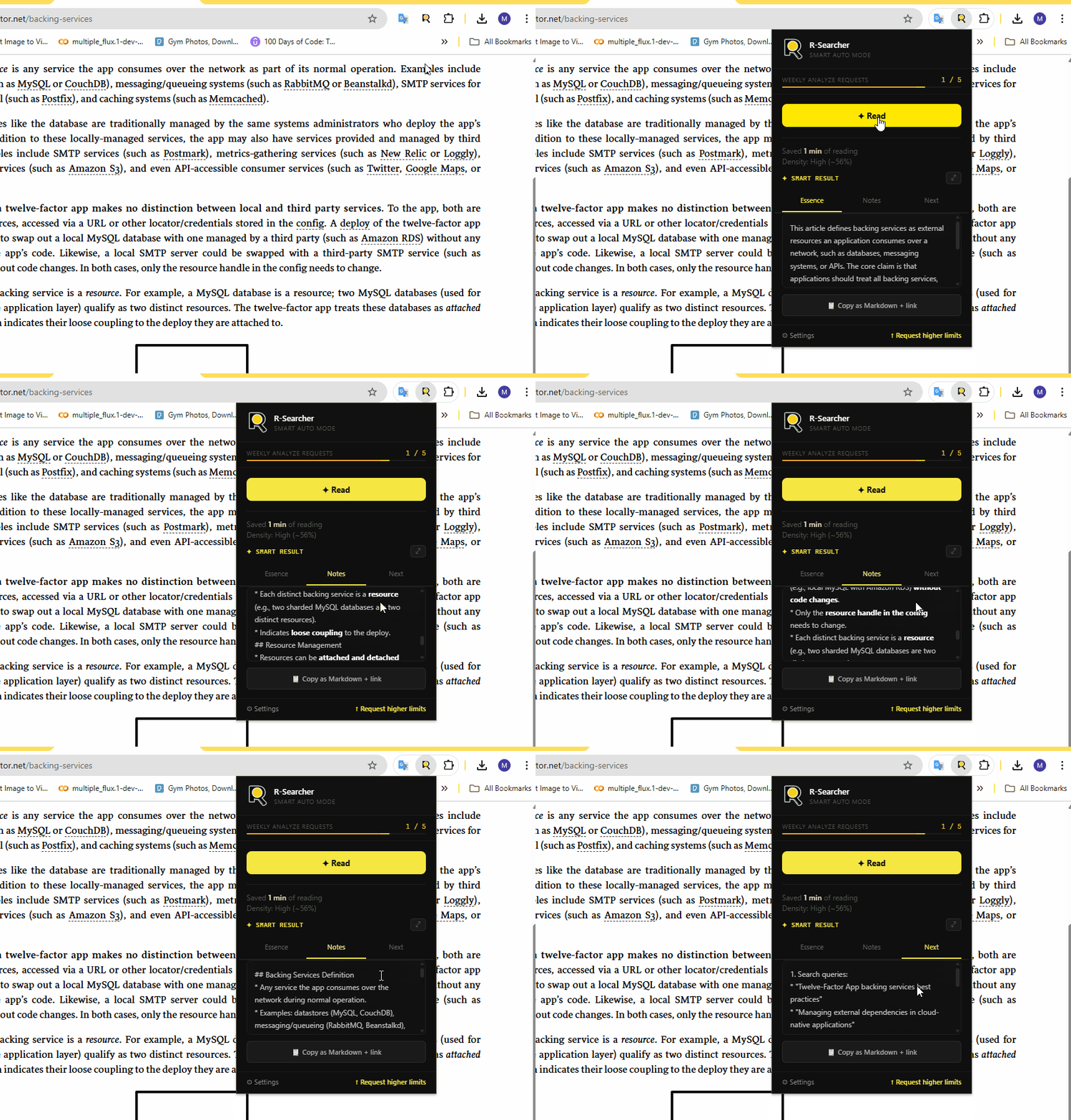
๐ŸŽฌ [ GIF: Full analyze flow โ€” open popup, click Read, tabs appear ] 860x480px ยท max 3MB ยท 5-8 sec loop
Free right now.
Built for the future.

R-Searcher is free during early access. Weekly limits keep the service stable while we tighten the product, improve reliability, and learn from real reading workflows.

Join the waitlist
5 article analyzes / week

Extract the essence, capture structured notes, and leave each read with concrete next steps.

70 text explanations / week

Select any passage and get plain-language clarity without breaking your reading flow.

Weekly reset every Monday at 00:00 UTC

A fresh allowance every week keeps the early-access experience predictable while we tune capacity.

Waitlist updates: join to hear about improvements, invite waves, and product changes as early access evolves.
What it does
Everything you need,
nothing you don't
โšก
Article Essence
3-5 sentences to decide if an article is worth your time. Done in 20 seconds.
๐Ÿ“ธ[ Screenshot: Essence tab ]640x320px
๐Ÿ“‹
Structured Notes
Markdown digest with only the insights worth keeping. Copy to Notion or Obsidian.
๐Ÿ“ธ[ Screenshot: Notes tab ]640x320px
๐Ÿงญ
Next Steps
Search queries, experts, related topics. Know where to go after this article.
๐Ÿ“ธ[ Screenshot: Next Steps tab ]640x320px
๐Ÿ’ฌ
Text Explanation
Select any text. Get a plain-language explanation โ€” technical, scientific, legal, or general.
๐ŸŽฌ[ GIF: Select text, tooltip appears, explanation shown ]640x320px ยท 3-5 sec loop
๐Ÿ”„
Follow-up Questions
"Explain differently", "Show an example", "Where is it used?" โ€” go deeper inline.
๐Ÿ“ธ[ Screenshot: follow-up buttons ]640x320px
๐ŸŒ
7 Languages
UI in your language. AI in the article's language. EN, RU, UK, ES, DE, FR, PT.
๐Ÿ“ธ[ Screenshot: UI in non-English locale ]640x320px
How it works
Open any article.
Press one button.
01

Open any article in Chrome

Works on any webpage โ€” news, research, blogs, documentation.

02

Click "Read" in the popup

Extracts article content, skipping menus, ads, and comments automatically.

03

Get Essence, Notes, Next Steps

Three tabs. Read the summary, copy the notes, explore what's next.

04

Select text โ†’ "What's this?"

Highlight anything unclear. Get an explanation and follow-up options instantly.

๐ŸŽฌ [ GIF: Full walkthrough โ€” popup, Read, tabs, select text, explain ] 480x420px ยท 8-12 sec loop
Explain selected text
CtrlShiftE
Analyze full page
CtrlShiftR
Copy last result
CtrlShiftC
Be first to know

R-Searcher is free now. Sign up below to hear about new features and improvements.

๐Ÿ‘‹

Early access waitlist

Tell us a bit about yourself so we can shape the product around how you'll use it.

โœ“

Welcome to early access!

We'll be in touch with updates and new features.

We read everything

Bug report, feature idea, or just want to share what works โ€” pick the right form below.

๐Ÿ’ฌ

Share your thoughts

Help us understand how you use R-Searcher and what would make it better.

โœ“

Thank you!

Your feedback shapes what we build next.

๐Ÿ›

Something broken?

Tell us what happened. The more detail, the faster we can fix it.

๐Ÿ›

Bug reported!

We'll look into it. Thanks for taking the time.