Open-source update

Read smarter,
not more

Open-source AI reading assistant for Chrome. Install the extension, point it at your own worker, and keep the full reading workflow on infrastructure you control.
Add to Chrome
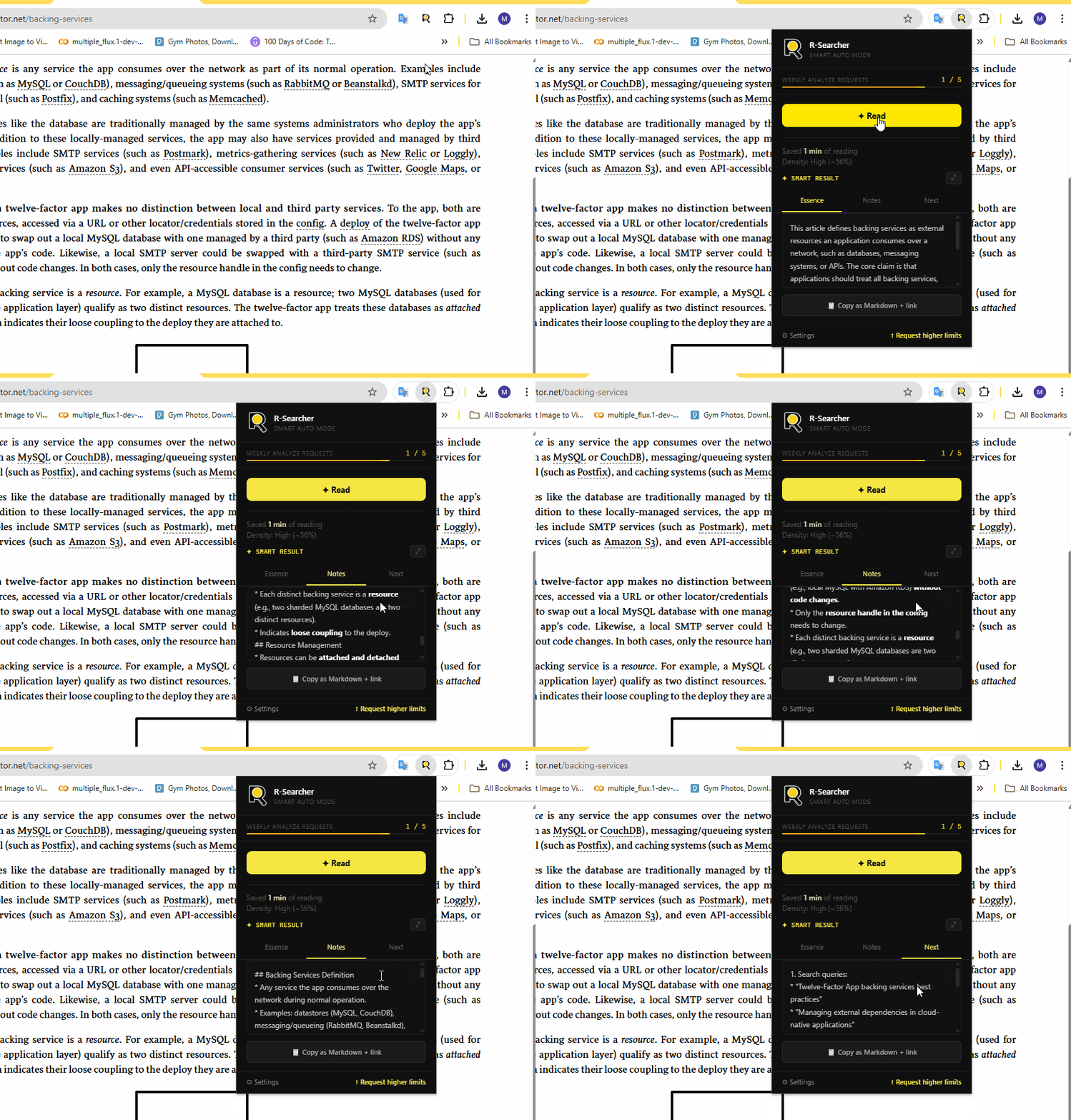
R-Searcher popup flow showing article analysis tabs appearing after clicking Read 🎬 [ GIF: Full analyze flow — open popup, click Read, tabs appear ] 860x480px · max 3MB · 5-8 sec loop
The extension and worker now live in a public repository.

R-Searcher is now documented as an open-source, self-hosted product. You can review the source, deploy your own worker, download the self-hosted version, and use the onboarding guide to wire everything together.

What changed
Public codebase

The browser extension and Cloudflare worker source are now public, so you can inspect the implementation and run your own deployment.

Source code is on GitHub The public repository now includes the extension, the worker, and the self-hosting documentation in one place.
Self-hosted setup is supported Deploy your own worker, paste its base URL into extension settings, and the extension is ready to process pages through your backend.
Additional materials live there too If you want the self-hosted version or supporting project materials, download them directly from the public repository.

Repository: github.com/indie-labs-dev/rsearch-copilot

What you can do now
Run it yourself

The quickest path today is to use the guide, deploy a worker, and connect the extension to your own backend origin.

Read the setup guide The onboarding page now covers install, worker deployment, and the settings step needed to activate the extension.
Use the packaged extension You can still install the Chrome extension build, then point it at the worker URL you deployed for your environment.
Send feedback or report issues Use the forms below if something breaks or if you want to suggest improvements to the open-source workflow.
Open repository
What it does
Everything you need,
nothing you don't
Article Essence
3-5 sentences to decide if an article is worth your time. Done in 20 seconds.
📸[ Screenshot: Essence tab ]640x320px
📋
Structured Notes
Markdown digest with only the insights worth keeping. Copy to Notion or Obsidian.
📸[ Screenshot: Notes tab ]640x320px
🧭
Next Steps
Search queries, experts, related topics. Know where to go after this article.
📸[ Screenshot: Next Steps tab ]640x320px
💬
Text Explanation
Select any text. Get a clear explanation for technical, scientific, everyday content.
🎬[ GIF: Select text, tooltip appears, explanation shown ]640x320px · 3-5 sec loop
🔄
Follow-up Questions
"Explain differently", "Show an example", "Where is it used?" — go deeper inline.
📸[ Screenshot: follow-up buttons ]640x320px
🌍
7 Languages
UI in your language. AI in the article's language. EN, RU, UK, ES, DE, FR, PT.
📸[ Screenshot: UI in non-English locale ]640x320px
How it works
Open any article.
Press one button.
01

Open any article in Chrome

Works on supported HTTPS pages — news, research, blogs, documentation.

02

Click "Read" in the popup

Extracts article content, skipping menus, ads, and comments automatically.

03

Get Essence, Notes, Next Steps

Three tabs. Read the summary, copy the notes, explore what's next.

04

Select text → "What's this?"

Highlight anything unclear. Get an explanation and follow-up options instantly.

🎬 [ GIF: Full walkthrough — popup, Read, tabs, select text, explain ] 480x420px · 8-12 sec loop
Explain selected text
CtrlShiftE
Analyze full page
CtrlShiftR
Copy last result
CtrlShiftC
We read everything

Bug report, feature idea, or just want to share what works — pick the right form below.

💬

Share your thoughts

Help us understand how you use R-Searcher and what would make it better.

Thank you!

Your feedback shapes what we build next.

🐛

Something broken?

Tell us what happened. The more detail, the faster we can fix it.

🐛

Bug reported!

We'll look into it. Thanks for taking the time.